


AI Agents Primitives
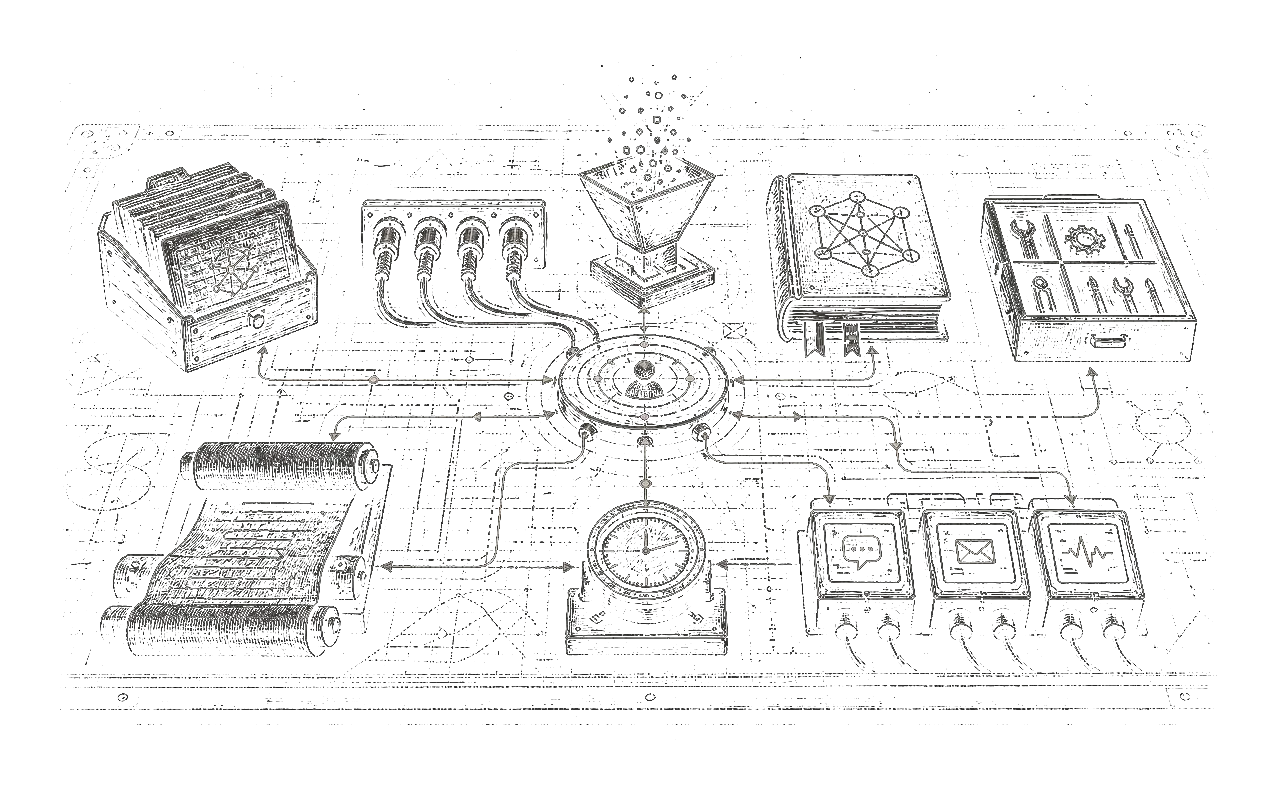
I want to explain what an AI company needs to run on the long term. These primitives are everywhere in the current tools and they are here to stay.
Let me explain what they are and why we need them. And for each piece I’ll give the human equivalent tool.
Skills
A skill is a recipe you can share with anyone. It contains examples of how to do something. You don’t have to overthink it, it’s really a tutorial on a specific task.
Examples of skills:
- How to format text properly to send a Slack message
- How to analyse a log to extract a bug
- What is the tone of voice to use in an email
- How to use the Gmail API
- How to analyse and solve a customer support ticket
- What are the best practices for landing page conversion
You start to see a pattern: skills can be generic or specific to your company. How to use the Gmail API is generic for any companies in the world but how to solve a customer support ticket is specific to you.
That’s why I like to split skills into two categories: - public: you can share them to the world. - private: contains private data and processes of your company that can’t be shared.
Skills will be used in agents and channels (more on that below). You have to treat them as first-class citizens and review them to be sure they are up to date.
A skill is a folder with:
- A root file named SKILL.md
- Can include references in a references/ folder.
- Can include scripts in a scripts/ folder.
Human equivalent: - “You can talk to Roberto when you want to deploy a new landing page he knows how to do it.” - “Call Andrea for the bug report on the n8n automation.” - “Text Michel about the ticket you’re handling I’m sure he knows something to help you.”
Connectors
The connector is the piece of “code” that will connect your agent to the outside world like Slack, Gmail, n8n, Google Drive, etc.
I like to split the connectors into two categories: - Read-Only: Can only fetch data but never modify data. For example a connector to read emails but never send emails. - Read-Write: Can modify data. Like sending Slack messages, drafting emails, modify a Google Spreadsheet.
You have to know exactly which connector is used and where. Of course you treat Read-Write connectors as “dangerous” and monitor them.
A connector is API Token access to a service and code to talk to the API:
- SLACK_ACCESS_TOKEN_READ_ONLY=.....
- send_slack_message.py
You can use MCP to connect to services but I prefer to own the full stack and have dedicated scripts for this.
Human equivalent: - Gmail account - Drive account - n8n account - Slack account
Ingestors
They are a piece of “code” that will use a connector in “read-only” to pull data into memory (more on that below). An ingestor is pure code (not an agent). It runs on a schedule like every hour to pull data from the outside world. This data will then be used to give context to the agents.
A connector can have different shapes but most of the time it’s a simple python script that saves data in a folder:
- ingest_gmail.py
- output to: emails/<YYYY>/<MM>/<DD>/<id>.eml
Human equivalent: - Searching a thread in Slack - Searching a mail in Gmail - Looking at the logs of Make and n8n
Wiki
Agents need context to perform a task.
A Wiki is a source of truth for your company.
It follows the Karpathy LLM Wiki idea.
It is a simple way to organise knowledge in a graph. A page can link to another one, etc.
The goal is to have agents navigating the wiki to gather context on a task.
A wiki is more about storing learnings about specific things.
The game is to extract data from the wiki and turn it into a skill later but having the wiki helps.
The content of the wiki is dated and stores a long-form record of what happened in the past.
It can include client-specific things like a page in wiki/pages/clients/nike.md:
“they like having their logo on every page of their documents because they are very brand oriented.”
It’s a very small example. You can store a lot of valuable information that comes from Slack messages, emails, and logs.
Because a wiki can include sensitive information, I like to have multiple wikis, for example one global (safe, preferred) and one wiki per team like:
- general/wiki
- sales/wiki
- engineers/wiki
- support/wiki
It’s not mandatory and I recommend having all in one wiki. But sometimes you want to isolate client data in another wiki to avoid exposing too much context to agents.
Human equivalent: - “Brandon, I’m trying to close a deal with Nike, what was the name of the designer that was working on the project in 2022? I need to talk to him before I’m sure it will help” - “I don’t remember what was the recurrent issues we got on the Make automation for Airbus. I need to search the root cause and what we learnt about it last year.”
Tools
An agent will probably do an action multiple times. A good way to have an effective agent is to have effective software. A tool is a simple python script that does one task like converting an image from PNG to JPEG. Or a script that extracts a specific value from an HTML page.
The goal is to have the agent writing the tools itself for its use case and reuse it later. It’s also more token efficient because you don’t want your agent to re-invent, discover, and search how to convert a PNG all the time.
Human equivalent: - Open Photoshop and create a macro (instead of re-applying the same filter again and again). - Create a SQL query to fetch specific data needed for a task instead of scrolling and copy pasting from a Excel Spreadsheet. - Add websites as bookmarks instead of searching them in Google every time you need them. - Open a presentation in PowerPoint and export it as PDF to send it by email.
Agents
Finally! An agent is the “glue” between all the concepts above. An agent is defined by:
- a list of skills
- a list of connectors
- a list of tools
- an access to the wiki
- a goal
- an input
- an output
An agent should be a thin layer that is able to have the right context to operate.
An agent will probably produce files (documents, images, video, etc) as an output but I also force them to generate a report.
I have a general agent guideline that makes my agent produce a standard output on each run: A markdown report and a JSON version:
home/runs/<YYYY-MM-DD>/<ISO-8601_timestamp>-report.mdhome/runs/<YYYY-MM-DD>/<ISO-8601_timestamp>-output.json
report.md body:
# Run Report
## Summary
## Input
## Actions
## Output
## Errors
## Assumptions
## Files and Artifacts
## Follow-ups
## Learnings
This way I can read the reports and learn things all the time. If something is valuable, I include it in the skill or agent instructions depending on the feedback.
For example I remember having an agent with an instruction like:
- GET the list of entries in the api at https://api.foo.com/api/entries
And I didn’t understand why it took an hour. Then I read the report and I saw:
## Learnings
The good API url is https://api.foo.com/api/v1/entries
and not https://api.foo.com/api/entries.
The agent finally found it but it was a bad instruction.
Damn. I fixed the typo in the instruction (adding the /v1 if you haven’t seen it) and that was it.
This kind of error is hard to spot without a report.
The second reason to always have a report is to be able to learn about the agent on the long term. “Read all the reports of the agent and tell me what instructions I can modify to have better results”
Memory and Logs
Another side effect of the agents is to generate some sort of memory and logs outside of the report.
Claude Code, Codex, Pi Agent, and others have a “sessions” or “project” internal mechanism to store the full trace of the agent in a .jsonl file. It’s useful to keep (I use an agent to centralise them all by date) because you can also learn a lot from them.
Most harness also have a “memory” system that saves conversations in markdown (nanoclaw) or have an “auto memory” layer.
I don’t like to use it because I want full control on the memory.
Having the wiki + the reports + the logs in json is good enough to have a solid memory system.
I still keep the official memory files generated just in case I need to have “full context” when debugging an agent.
Scheduled Jobs
When you have all of the above, you can schedule an agent to run every hour, every day, etc. It’s that simple. Most AI systems have a scheduler to run tasks on a daily basis.
Dream cycle
I call it REM Sleep Cycle: It’s an agent that reads all the reports produced by all the agents and creates a summary, every night, of what can be improved in the general process. It’s a useful one because it forces you to keep on top of your agents and monitor them properly.
Channels
When you use a tool like hermes or nanoclaw, a channel is a way to communicate with your agents. I like to have a channel per “project”. A channel has Skills, Connectors, access to the wiki (like agents). A channel does not trigger anything alone like an agent. You can trigger an agent from the channel. You can ask one-off questions in the channel. The channel can be used to notify you when an agent starts and finishes, with a link to the report.
Conclusions
Codex, Claude Code, and the other AI coding tools are all working with these primitives. They seem to be stable and clear now. I spent the last 6 months experimenting with agents and I feel like I’ve reached a point where I don’t need more than that to accomplish any task with AI. Of course you can have better “reports”. I like the latest work by Google “Open Knowledge Format” that tries to have a formal way of structuring the wiki. It’s a very good read and it confirms that the Wiki primitive is a very simple way to organise data for humans and for agents.
The challenge of the agent workflows is to keep the skills and the wiki up to date. The human review is essential to keep the system sane.